QuickRoom
A named chat room you create, share as a link, and let expire. Nickname only — no account.
18+ text chat in the browser. Not a video lounge, not a K–12 classroom product.
About QuickRoom · How it works
Public topic rooms
The three newest public rooms appear here after the page loads so the homepage stays readable as the list grows. Older public rooms open under a control named User Created Rooms. Private rooms never appear in that list — share those with a link.
What QuickRoom is (and is not)
QuickRoom is a named room in the browser. You pick a template and a title, set when the room should expire, choose a nickname, and get a code plus a link of the form /?room=…. Anyone with that link can open the same thread. There is no user database, so there is no password reset and no way for us to email you a transcript later.
It is not Zoom (no video grid). It is not Discord (no servers or roles). It is not WhatsApp (no phone number, no contact sync). If you need those products, use them. If you need a named text room for a few hours or a few weeks, this is the narrower tool.
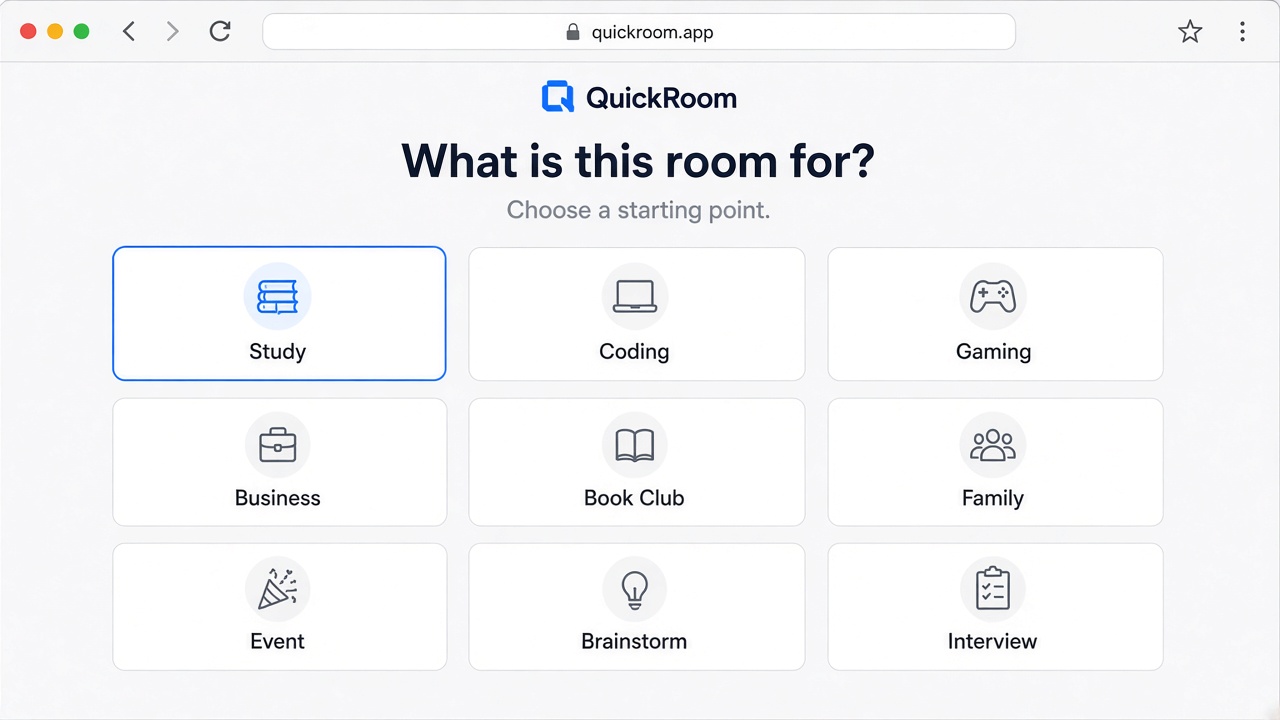
How a room is created
- Create a room and choose a template (study, event, interview, or blank).
- Set how long it should live. That timer is the product: the chat is meant to end.
- Share the code, link, or QR only with the people who should join.
- Talk in the browser. When the work is done, let the room expire instead of leaving another group on everyone’s phone.
Side-by-side with other chat products
The same table appears in the comparison walkthrough. Short version: WhatsApp and Discord keep identity and history; QuickRoom keeps a room id and whatever is still in memory until expiry.
| QuickRoom | Discord | Slack | ||
|---|---|---|---|---|
| Signup / phone number | None (nickname + room code) | Phone number | Account | Workspace account |
| Where it runs | Browser | App | App or browser | App or browser |
| Typical leftover | Room expires on a timer you set | Group stays on the phone | Server stays until someone deletes it | Channel/workspace stays |
| Best when | One assignment, shift, interview, trip, or handoff | People you already text | A community you will keep | A company that already lives in Slack |
| Poor fit | Under-18 / K–12; stranger video chat | Mixed-phone groups who should not swap numbers | A 90-minute panel | External guests for one hour |
| Official records | Not an ATS, LMS, or contract store | Not a records system | Not HR/legal storage | Can be, if IT says so |
Questions people actually ask
Do I need to create an account?
No. You pick a nickname. The browser uses an anonymous session so you can stay in that room until it expires.
Where do ads appear?
On public articles, use-case pages, privacy, and About—not on Create/Join and not inside a live room. Blog and privacy use in-article native ads and a desktop sticky bar rather than a stack of banners. We keep the conversation free of ad units.
Is this for children or school classes under 18?
No. QuickRoom is 18+ only. Use your school’s approved tool for K–12.
What happens when a room expires?
Messages and images for that room are removed according to the expiry you chose (from one hour up to three months).
Who builds QuickRoom?
The product is open source on GitHub. Contact [email protected].
Exact jobs QuickRoom is built for
Each link is a specific coordination job. Templates on create are title shortcuts for these jobs.
- Private chat room without signup — Free private chat room / anonymous chat with no account, no phone number, no app—share a room code and talk online.
- Temporary chat room / free chat rooms — Create a temporary chat room or free chat room online. Chat online free in the browser, then let the room expire.
- Study group chat / group chat no WhatsApp — Online chat rooms for revision and homework—group chat and text chat without WhatsApp or phone numbers.
- Event volunteer live chat — Coordinate staff with a private live chat room, join link, and QR—webchat for the shift, then it ends.
- Classroom backchannel / chat room — Collect questions in a free chat room during class—online chatting without another permanent group.
- Workshop Q&A chat online — Audience questions via chat online free: join link or QR into a short-lived chatroom.
- Meetup organiser group chat — Backstage logistics in a private group chat / chat room for hosts and speakers—no signup wall.
- Event backchannel chat rooms — Short-lived online chat rooms for attendees and staff—chat now, expire when the event ends.
- Travel planning group chat — One trip, one free chat room for plans and photos—temporary group chat that expires after travel.
- Family planning chat online — Family text chat and live chat without forcing everyone onto the same messaging app.
- Client image chat / private chat — Share mockups in a private chat room without signup—browser webchat for one engagement.
- Freelance handoff chat room — Delivery notes in a temporary chat room—chat free online, then the room closes.
- Interview prep chat online — Short-lived chat room for candidates or panels—online chat without permanent accounts.
- Temporary support live chat — Launch-day or office-hour live chat / free chat rooms—help people chat online free, no signup.
- Hackathon team chatroom — Sprint coordination in a temporary chatroom—group chat and text chat for the event only.
- Book club online chat rooms — Discuss chapters in a free chat room online—private chatting that ends when the club wraps.
- Interview panel private chat — Panel coordination in an anonymous-friendly private chat room—no phone numbers required.
- Study group free chat rooms — Exam prep in free chat rooms and online chat rooms—create a room, share the code, revise together.
- VPN travel group chat — Trip planning next to a travel VPN—private room code, then the chat expires.
- Housemate bills and utilities — Rent, energy, broadband, and insurance quotes in a timed flat chat.
- Dating group chat (18+) — Group-date logistics without adding everyone on WhatsApp. Not a dating app.
- NFL / Premier League watch party — Match-day banter for friends. Not a bookmaker. The room expires with the fixture.
- Halloween party planning — Costumes and ice in a group chat that ends 1 November.
- Black Friday deal chat — Cyber Monday finds without a January notification hangover.